 Zinn® Cache
How to clear the cache in WordPress
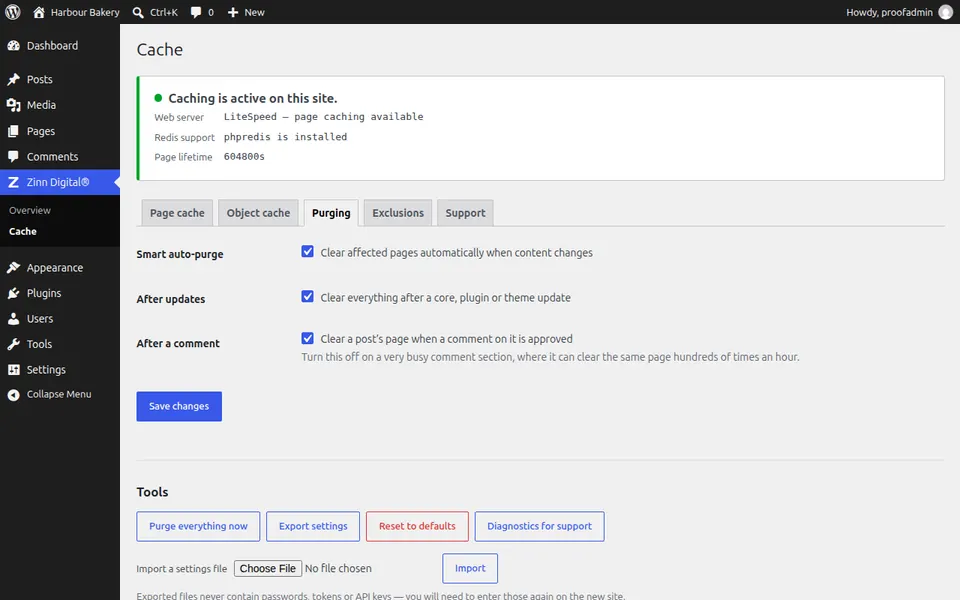
Clear every cached page at once, or let the plugin clear only what changed. Where the purge button is in Zinn® Cache.
You usually do not need to
Both plugins purge automatically when content changes. Clear everything by hand only when a change was made outside WordPress, such as a file edited on the server.
In Zinn® Cache
Open Zinn Digital®, then Cache, and press Purge everything now. Confirm, and every cached page is discarded and rebuilt as visitors arrive.
With Zinn® Cache Pro
Pro purges more precisely on its own: a changed post clears its own category, tag and author pages rather than every archive, and its warm-up refills the cache after a full purge.
Clear your browser too
If you still see an old version, your own browser may be holding it. Reload with the cache bypassed, or open the page in a private window.
Check the result
Load the page signed out: the first response reads miss, and the next one hit.
Next guide: Exclude a page from the cache
Included free with Zinn Digital® hosting
Get Zinn® Cache free on Zinn Digital® hosting
Every WordPress site on our own servers comes with Zinn® Cache installed and connected: the page cache is on, the Redis object cache is managed for you, and plugin updates arrive on their own. Zinn® Cache Pro is not included; add it to any site when you want it.