 Zinn® Cache
Free for good, not a trial: the cache keeps working with no licence key and nothing to renew.
Compare
A free FlyingPress alternative
FlyingPress is a paid speed plugin with a 14-day trial. Zinn® Cache is free for good, with a paid Pro add-on only if you want it. How they compare.
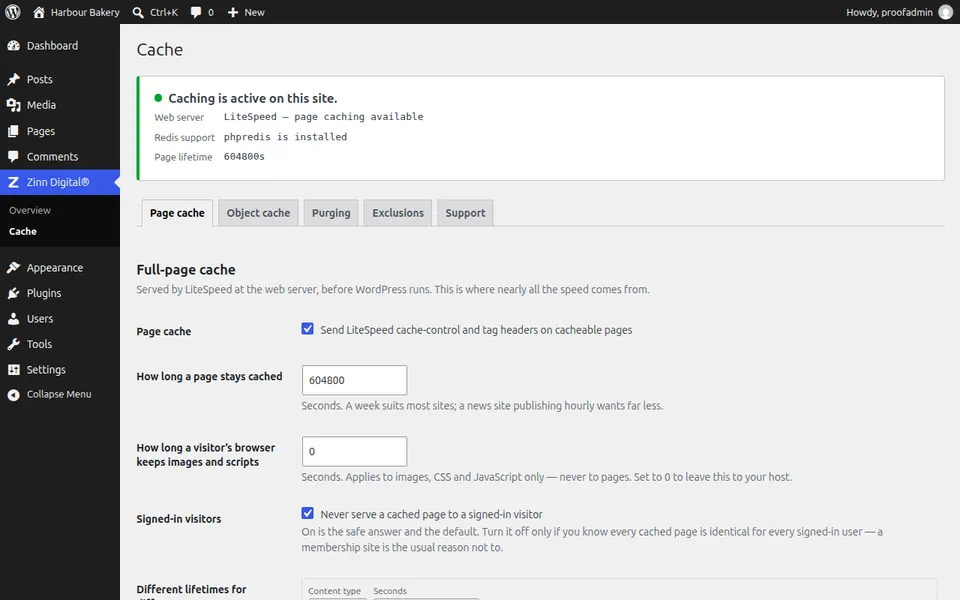
The short answer
FlyingPress is paid after a 14-day trial. Zinn® Cache is free for good, and its Pro add-on starts lower, at $49 a year, if you want optimisation on top.
| Zinn® Cache | FlyingPress | |
|---|---|---|
| Price | Free; Pro add-on from an annual licence | From $59 a year for 1 website[1] |
| Free version | Yes | No — a 14-day free trial[1] |
| Server needed for its page cache | Any server: LiteSpeed's cache or a file cache | Not stated on the pricing page[1] |
| Object cache | Redis; Pro adds an APCu tier | Not stated on the pricing page[1] |
| Optional third-party online services | None in the cache; Freemius for Pro's licence | Not stated on the pricing page[1] |
Sources
Why people choose Zinn® Cache over FlyingPress
A Redis object cache and tag-based purging are included in the free plugin.
If you add Pro, it starts at $49 a year with a free trial and no card needed.
Where it is the better choice
FlyingPress is one paid plugin focused on page speed, with plans up to unlimited sites and staging sites not counted against the licence. If you want a single commercial plugin for everything speed, it is worth a look.
Where Zinn® Cache fits
Zinn® Cache gives you the cache itself — page cache, object cache and smart purging — for free, with no trial clock. Pro adds optimisation from $49 a year when you are ready.
How to switch from FlyingPress in three steps
Install Zinn® Cache, keep it switched off
Add the free plugin from your WordPress dashboard. Before you turn it on, note which pages FlyingPress leaves uncached — cart, checkout, account pages — so you can check they stay uncached after the move.
Deactivate FlyingPress, then turn Zinn® Cache on
Never run two page caches at once. Deactivate FlyingPress first, then switch Zinn® Cache on. Shop and signed-in visitors are left out of the cache by default.
Check it is working
Open your site in a private window and reload: the status panel shows which page cache is in use, and the guide on checking your cache shows how to read the response headers. Then delete FlyingPress for good.
Questions about switching from FlyingPress
Can I run Zinn® Cache and FlyingPress together?
Not as two page caches — two caches storing the same page fight each other and make problems hard to find. Deactivate FlyingPress before you switch Zinn® Cache on.
Is Zinn® Cache really free?
Yes. The page cache, tag-based purging, the Redis object cache and shop-safe exclusions are free for good, with no licence key. Zinn® Cache Pro is an optional add-on from $49 a year, with a free trial and no card needed.
Will my site be faster than with FlyingPress?
Any good page cache makes the biggest difference: on our own measured test a cached page started arriving in 40 ms instead of 107 ms. How Zinn® Cache compares with FlyingPress on your site depends on your host and theme, so measure before and after — the benchmark page shows how.
More WordPress cache plugin comparisons
- A free WP Rocket alternative
- LiteSpeed Cache or Zinn® Cache?
- A W3 Total Cache alternative
- A WP Super Cache alternative with an object cache
- A NitroPack alternative that runs on your own server
- A WP Fastest Cache alternative
Competitor details were read from their own public pages on the date shown. Tell us if something has changed and we will correct it.
Included free with Zinn Digital® hosting
Get Zinn® Cache free on Zinn Digital® hosting
Every WordPress site on our own servers comes with Zinn® Cache installed and connected: the page cache is on, the Redis object cache is managed for you, and plugin updates arrive on their own. Zinn® Cache Pro is not included; add it to any site when you want it.