 Zinn® Cache
Warm the cache after a purge
Set up Zinn® Cache Pro's warm-up so pages are rebuilt into the cache after a purge instead of waiting for a visitor.
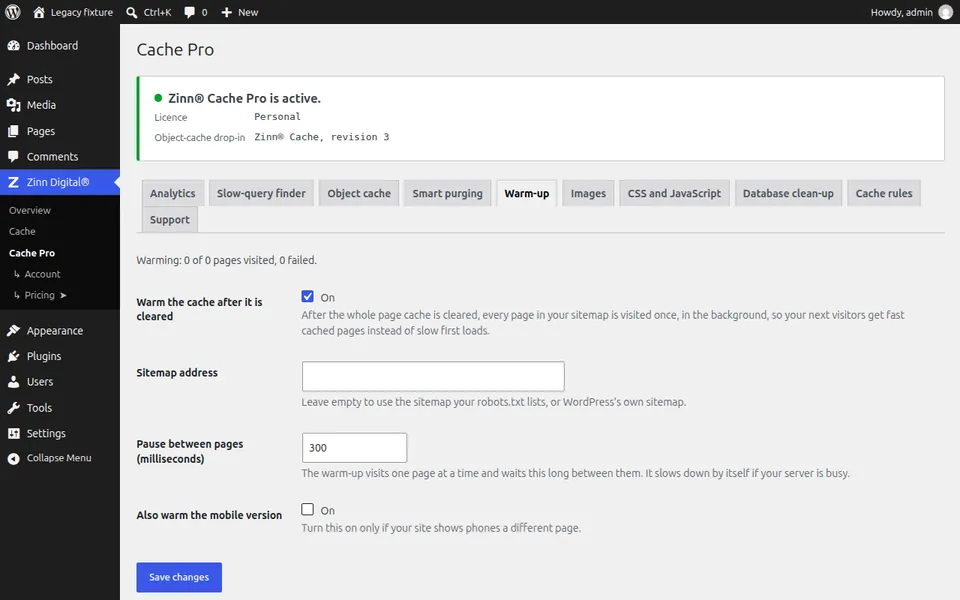
It needs Zinn® Cache Pro
Warm-up is part of Zinn® Cache Pro. It requests your own pages in the background, one at a time.
Point it at your sitemap
Open Zinn Digital®, Cache Pro, then Warm-up. Leave Sitemap address empty to use the sitemap your robots.txt lists, or WordPress's own at /wp-sitemap.xml.
Turn it on
Turn on Warm the cache after it is cleared and save. Keep the default pause between pages; it slows down by itself if the server is busy.
Warm it now
Press Warm the cache now to start a pass straight away. It picks up where it left off if it is interrupted.
Next guide: Update the plugins, or go back to an earlier version
Included free with Zinn Digital® hosting
Get Zinn® Cache free on Zinn Digital® hosting
Every WordPress site on our own servers comes with Zinn® Cache installed and connected: the page cache is on, the Redis object cache is managed for you, and plugin updates arrive on their own. Zinn® Cache Pro is not included; add it to any site when you want it.