 Zinn® Cache
Exclude a page from the cache
Stop a page, a query parameter or a cookie from ever being cached — and the defaults that are already excluded for shops and signed-in visitors.
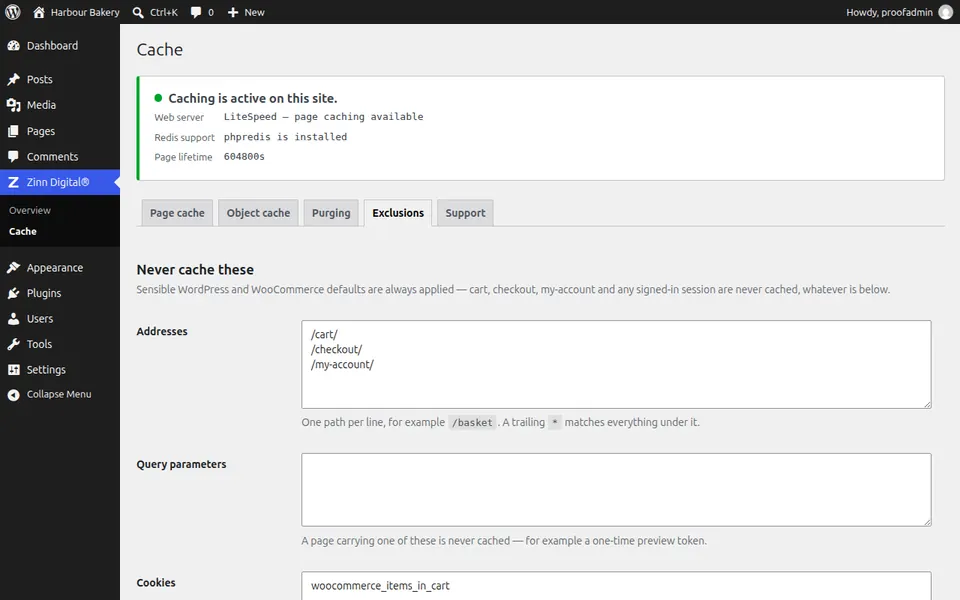
Know what is already excluded
Cart, checkout and my-account pages, REST and AJAX requests, previews, search results, and visitors with login, password-protected post, comment or shop session cookies are excluded without any setup.
Open the Exclusions tab
In Zinn® Cache, open Zinn Digital®, Cache, then Exclusions. Zinn® Cache Pro adds rules for individual pages on its Cache rules tab.
Exclude an address
Add one path per line, such as /basket. A trailing asterisk matches everything under it, so /members/* excludes a whole section.
Exclude by query parameter or cookie
A page carrying a listed query parameter is never cached — useful for preview tokens. A visitor carrying a listed cookie prefix is always served a fresh page.
Save and test
Save, then load the excluded page signed out. It should never show hit.
Next guide: Set how long pages stay cached
Included free with Zinn Digital® hosting
Get Zinn® Cache free on Zinn Digital® hosting
Every WordPress site on our own servers comes with Zinn® Cache installed and connected: the page cache is on, the Redis object cache is managed for you, and plugin updates arrive on their own. Zinn® Cache Pro is not included; add it to any site when you want it.