 Zinn® Cache
Set how long pages stay cached
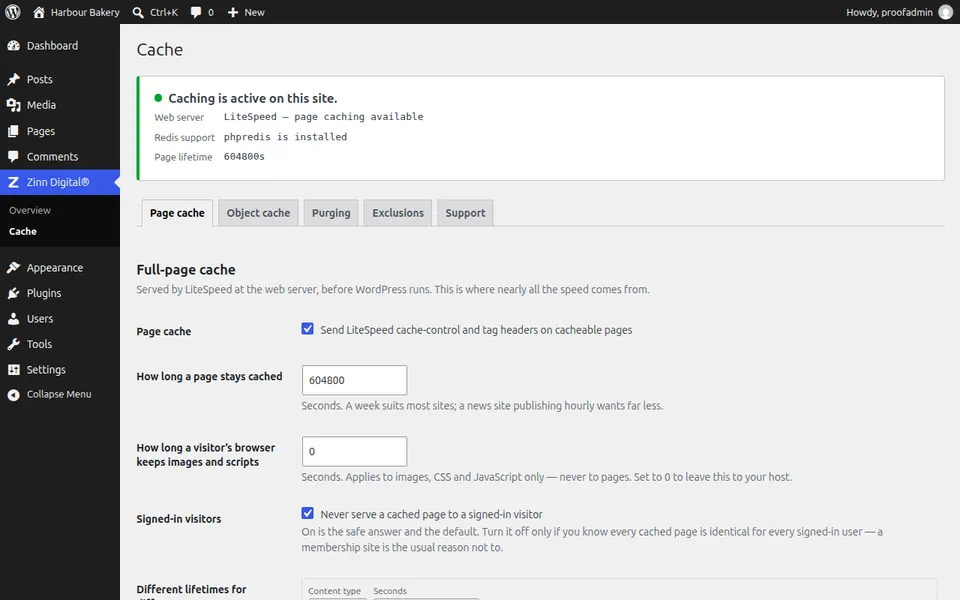
Choose a page cache lifetime, set a different one for products or posts, and control how long browsers keep images, CSS and JavaScript.
Start from the default
Zinn® Cache keeps a page for a week, 604800 seconds. Automatic purging clears a page when its content changes, so a long lifetime does not mean stale content.
Shorten it for fast-moving sites
If pages show information that changes without an edit — prices from a feed, event times — lower How long a page stays cached on the Page cache tab.
Add a rule per content type
Under Different lifetimes for different content, press Add a rule, choose a content type such as products, and enter seconds.
Set the browser lifetime
How long a visitor's browser keeps images and scripts applies to images, CSS and JavaScript only, never to pages. Leave it at 0 to let your host decide.
Next guide: Turn on the Redis object cache for WordPress
Included free with Zinn Digital® hosting
Get Zinn® Cache free on Zinn Digital® hosting
Every WordPress site on our own servers comes with Zinn® Cache installed and connected: the page cache is on, the Redis object cache is managed for you, and plugin updates arrive on their own. Zinn® Cache Pro is not included; add it to any site when you want it.