 Zinn® Cache
Clean up the WordPress database
Remove post revisions, auto-drafts, expired transients and old bin and spam items with Zinn® Cache Pro's Database clean-up tab, safely.
Take a backup first
Database cleanup deletes rows permanently. Make sure you have a backup you can restore before you start.
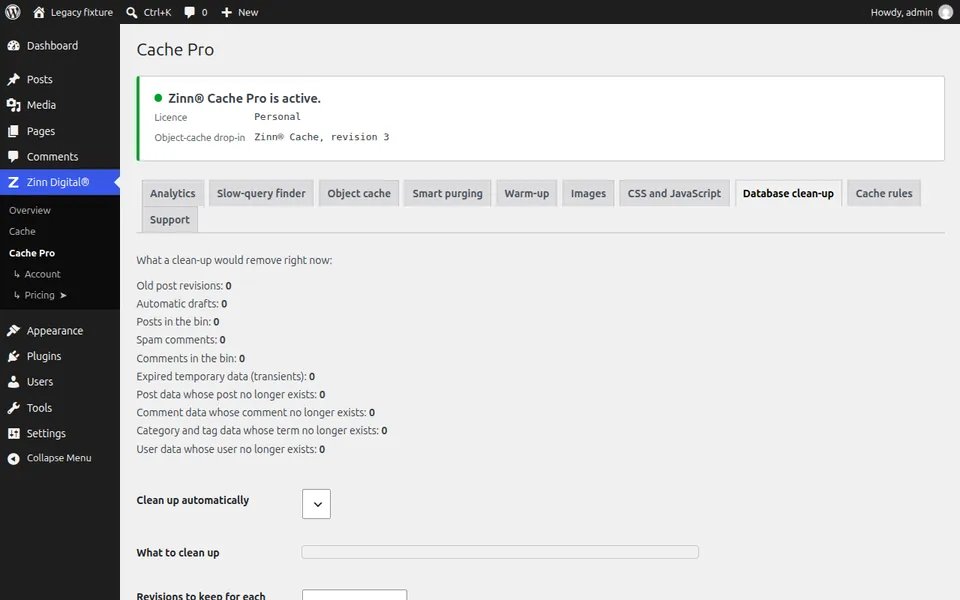
Open Database clean-up
In WordPress open Zinn Digital®, Cache Pro, then Database clean-up. It lists each kind of data with how many rows it would remove.
Choose what to clean up
Tick the kinds of data to remove. Auto-drafts, expired transients and old bin and spam items are safe to remove; revisions are safe if you do not need an edit history.
Keep some revisions
Set how many revisions to keep for each post, and how old a bin, spam or draft item must be before it is removed. Then press Clean up now.
Schedule it if you want
Turn on Clean up automatically, and the same choices run on a schedule, so the database stays tidy without manual runs.
Next guide: Warm the cache after a purge
Included free with Zinn Digital® hosting
Get Zinn® Cache free on Zinn Digital® hosting
Every WordPress site on our own servers comes with Zinn® Cache installed and connected: the page cache is on, the Redis object cache is managed for you, and plugin updates arrive on their own. Zinn® Cache Pro is not included; add it to any site when you want it.