 Zinn® Cache
Turn on the Redis object cache for WordPress
Install the Redis object-cache drop-in from Zinn® Cache, connect it to your Redis server, and what happens if Redis stops answering.
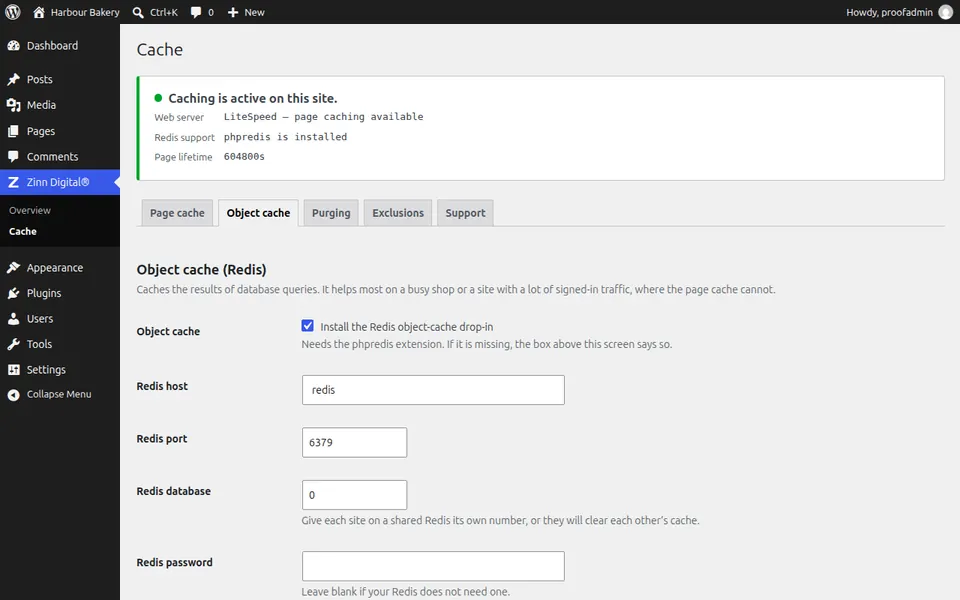
Check Redis support
The status panel on the Cache screen shows whether the phpredis PHP extension is installed. Without it the object cache toggle is disabled.
Open the Object cache tab
In Zinn Digital®, Cache, choose Object cache and tick Install the Redis object-cache drop-in.
Enter the connection
Set the Redis host, port and, if needed, password. On a Redis server shared by several sites give each site its own database number or key prefix, or they will clear each other's cache.
Save
The drop-in is installed into wp-content. Zinn® Cache never overwrites a drop-in that belongs to another caching plugin, and tells you if one is already there.
Know the fallback
If Redis becomes unreachable, the drop-in answers from an in-memory cache for that request, so the site stays up while Redis is fixed.
Next guide: Minify CSS and JavaScript and lazy-load images
Included free with Zinn Digital® hosting
Get Zinn® Cache free on Zinn Digital® hosting
Every WordPress site on our own servers comes with Zinn® Cache installed and connected: the page cache is on, the Redis object cache is managed for you, and plugin updates arrive on their own. Zinn® Cache Pro is not included; add it to any site when you want it.